Part of our guide to Best AI workspace for business in 2026: the landscape compared
On this page · 9 sections
- Is Muse AI available in Australia?
- What Meta Muse does, and what to verify
- Muse AI CRM automation: questions a buyer should ask
- Muse, Grok Bot and ChatGPT: compare the same job
- What does Muse AI cost compared with Cortex?
- Where Cortex has relevant Australian customer examples
- Memory, permissions and a handover to a person
- A practical shortlist for an Australian owner
- Frequently asked questions
This guide concerns Meta’s personal agent at muse.ai, including its small-business offering. Other products and older pages also use the name Muse. Confirm the provider and domain before comparing prices, installing an app or connecting an account. We reviewed official product information on 14 November 2026; availability and subscriptions can change. This is a documented-capability comparison and proposed evaluation plan, not a hands-on benchmark of Muse against Cortex.
The useful buying question is what happens between your instruction and a checked result. An agent might prepare a proposal, update a contact or draft a reply, but each action needs an owner and a clear endpoint. Our business AI workspace comparison helps separate a personal assistant, a connected business workflow, a CRM and a developer platform. Those products may overlap without replacing every part of your existing setup.
Is Muse AI available in Australia?
The current Muse for Small Business page lists availability for adults in the US and Canada and gives no additional rollout timing. It therefore does not establish Australian availability or an Australian release date. Check that official page again before making a purchasing decision. An Australian review, an accessible website or an app listing alone is not confirmation that your business can use every service described.
If you need a workflow running locally now, give prospective suppliers a small demonstration brief and confirm your eligibility directly. Ask about your billing country, required applications, supported phone numbers and support hours. Keep the answers with the dated proposal. Avoid arranging an operational dependency around an assumed release date. You can still learn from Muse's approach while choosing a product currently offered for the work your business needs.
What Meta Muse does, and what to verify
Meta describes Muse as a personal agent with its own persistent cloud computer and browser, used through supported conversational interfaces. The small-business offering adds skills and connectors. That makes it relevant to business owners who want work prepared across applications rather than another place to ask questions. It does not mean every operation in every business application will work without setup or supervision.
On the business product page, Meta lists examples including HighLevel, Shopify, QuickBooks, Slack, Stripe and Meta business accounts. It also describes approval controls and an audit trail. These are meaningful capabilities to evaluate fairly; it would be inaccurate to say that Muse cannot connect business tools or seek approval. Test the exact connector, operation and account level you require instead of relying on a category label.
For any proposed setup, distinguish reading a record from modifying it, creating a draft from sending it, and finding a supplier from buying something. Ask which operations the connector supports and which use browser access or a separate integration. Record what is demonstrated and what remains unverified. A screenshot of an app logo does not prove that the workflow includes your custom fields, attachments, ownership rules or exception cases.
Muse AI CRM automation: questions a buyer should ask
Start with an actual sales process: a new enquiry arrives, an existing contact may already exist, an opportunity needs an owner and someone must approve the first response. Ask the agent to show the source message and matched record before proposing a change. Then inspect the CRM after one approved update. A well-written completion message is useful only when the intended business record is correct.
Use synthetic examples with a duplicate email, a shared company name and one missing field. Check that the process asks for help when the match is ambiguous, preserves earlier notes and avoids creating a second contact on retry. If you have several staff, test who can approve the change and who sees the resulting task. Keep sending disabled until you understand how the connector enforces that boundary.
Read our CRM follow-up queue guide for the process design. Compare the Cortex CRM workflow and, if you are choosing a standalone record system, Fulcrum CRM modules. This article does not announce a Muse-to-Fulcrum connector. A potential API or browser workflow must be demonstrated and checked before it is described as a supported production integration.
Muse, Grok Bot and ChatGPT: compare the same job
Use the same brief, input files and acceptance criteria when evaluating different agents. If one receives a prepared spreadsheet and another has to find the original records, the results are not comparable. Measure whether the result is correct, how much a person reviews, where the evidence is stored and how failures are recovered. Keep separate notes for documented features and behaviour you have actually observed.
The Grok Bot alternative guide includes a practical CRM test. Our ChatGPT business comparison discusses when a general assistant is sufficient and when connected workflows become useful. Do not assume an assistant only writes text: modern products can also use tools and perform multi-step tasks. The useful distinction is the specific supported work and operating arrangement you are buying.
An owner who needs research and drafting may be well served by a general assistant. A team maintaining a shared pipeline may need records, permissions and a review queue as well. A developer may prefer a programmable agent framework. Write down the gap in your existing process first. Choosing a larger platform before identifying that gap can add another subscription without removing the work that frustrates you.
What does Muse AI cost compared with Cortex?
The official Muse business page describes free access for many needs and links to subscription plans for additional usage. Check your eligible account for current prices, limits, currency and tax. We have not verified an Australian Muse purchase or a price for every plan. A price attached to a different Muse-branded product is not evidence about Meta's offering, and an old launch article may no longer describe current terms.
Cortex pricing provides the current published options for its own product. List the tasks, review effort, software and usage required for your actual package. Ask separately about voice charges, additional deployments, model usage and human assistance. Compare the total cost of a completed job rather than the cheapest headline subscription. A larger allowance is valuable only if the service completes the work you intend to delegate.
For a two-week evaluation, record the manual baseline, each attempted task, the result, the correction time and any charge. Include tasks that failed or were abandoned. Keep a separate count of work prepared and work approved or sent. You can use the AI agent evaluation worksheet to collect comparable observations. It is a planning worksheet, not a benchmark or a forecast of savings.
Where Cortex has relevant Australian customer examples
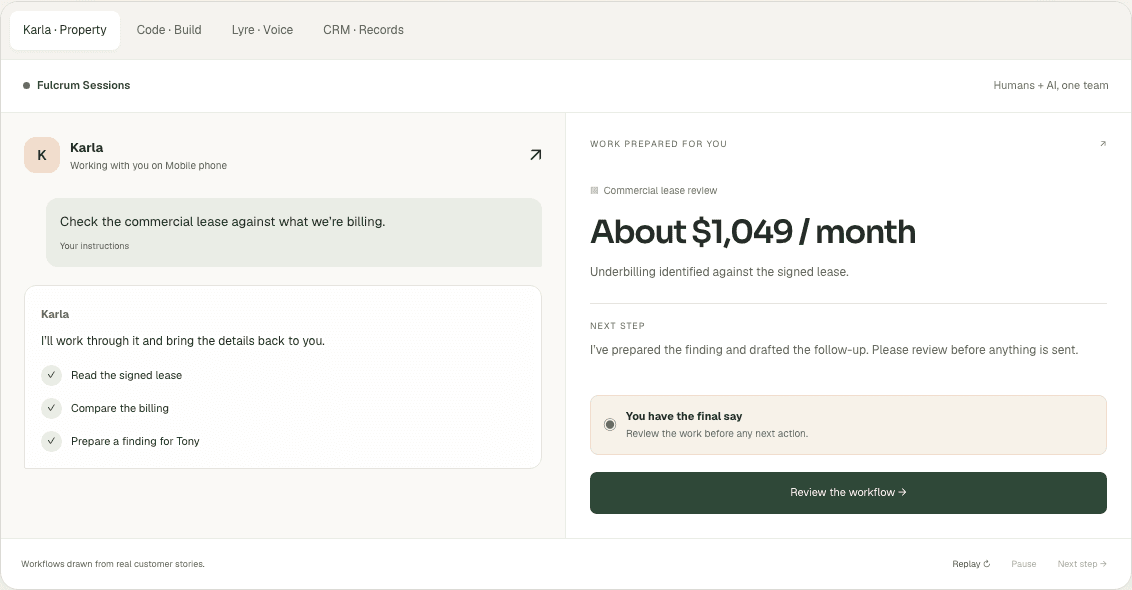
The Cortex customer stories describe property administration, prospect research, software development and practice admin. For example, Elite Partners Real Estate describes checking lease billing; Nitrobots.ai describes researching prospects and preparing a proposal. Those accounts give you concrete work to discuss in a demonstration. They are not a controlled test against Muse and do not establish the same financial result for another customer.
A property manager could ask for a synthetic lease and billing comparison, with the source clause, discrepancy and proposed next step shown for review. A consultant could ask for a research brief with source links and uncertain claims clearly marked. A practice owner could ask how approved notes and invoices stay linked. Do not upload sensitive client material merely to find out whether a sales demonstration works.
See the Cortex workflow demonstration, then agree your own success criteria. If calls matter, evaluate the voice workflow and Fulcrum Lyre separately. An Australian business should ask about its exact numbers, call handling, escalation, data flows and configuration. Australian ownership, Australian data storage and Australian model processing are different facts; verify each claim relevant to your requirements.
Memory, permissions and a handover to a person
A long conversation is not a substitute for an accessible business record. Agree where the current task, its next action and supporting evidence live. Ask how a colleague can continue the work when the original requester is away. Test changing an instruction and correcting an incorrect note. Useful memory is information your business can inspect and manage, not just a reassuring statement that the agent remembers.
Write an approval list before expanding access: customer messages, publication, spending, deletion and changes to important records. Give the agent the minimum access needed for the chosen task. Ask for a demonstration in which it lacks a required permission and must request help. Then test a person taking over. The workflow should show what is finished, what failed and what is waiting for a decision without relying on guesswork.
Use the least-privilege guide and approval gates as planning aids. Review the supplier's current terms and data processing documentation for your actual package. A model can misunderstand a request, and connected tools can fail. Choose an arrangement that makes those failures visible and recoverable; do not treat any product comparison as a promise that mistakes cannot happen.
A practical shortlist for an Australian owner
- Define one recurring job, its frequency and the person who approves its result. Keep preparation and external action separate in the brief.
- Confirm availability, supported applications and total usage terms directly with each supplier. Date the answers so they can be checked again later.
- Give each product equivalent synthetic inputs, including a duplicate, a missing field and an exception. Inspect results in the underlying system.
- Measure completion, review time, failed attempts and cost. Keep the original inputs and an export of the result outside the agent conversation.
- Expand only after the first workflow is reliable enough for your business. Test escalation, cancellation and export before depending on it daily.
If you are evaluating Cortex, request a demonstration with that brief. If your existing assistant already satisfies the acceptance checks, keep it on the shortlist. If the work follows fixed rules, compare conventional automation as well. The aim is to select a service that completes your actual job at a cost and level of oversight you can sustain, rather than buy whichever agent currently attracts the most attention.
Frequently asked questions
Is Meta Muse AI available in Australia?
As checked on 14 November 2026, the official Muse for Small Business page lists adults in the US and Canada and gives no additional rollout date. Check the provider for changes.
Can Muse work with a CRM?
Meta lists business connectors including HighLevel. Verify your specific application, account and required operations; this guide does not establish a direct Fulcrum CRM connector.
Is Muse AI free?
The official business page describes free access for many needs and links to subscriptions for additional usage. Confirm current account eligibility, allowances, currency and tax.
How should I compare Muse and Fulcrum Cortex?
Use an equivalent synthetic business task and measure the correct result, review time, permissions, recovery, total cost and availability. This guide is not a hands-on benchmark.
Sources
- Muse for Small Business — capabilities and availability · Meta
- Muse — personal agent and cloud computer · Meta
- Introducing Muse · Meta
General information only, not legal, financial or professional advice. Check the source for your circumstances.